ControlClaw vs Freelancers vs Theme Tools: A Complete Comparison
Every Shopify store owner faces the same challenge: how do you make theme updates without breaking the bank or wasting precious time? Whether it's updating a banner, tweaking your product layout, or adding a new section, you have three main paths forward.

Let's break down each option so you can make the right choice for your business.
Your Options for Shopify Theme Updates
When you need changes to your store, you typically choose between hiring a freelancer, using basic theme editors, or leveraging AI-powered tools like ControlClaw. Each has its place, but the differences in cost, speed, and reliability are significant.
Option 1: Hiring Freelancers
Freelance Shopify developers have long been the go-to solution for store owners who need professional help.
The Pros
- Expertise: Experienced developers understand Shopify's quirks and best practices
- Custom Solutions: They can build complex, custom functionality from scratch
- Human Judgment: A skilled developer can advise on UX and design decisions
The Cons
- High Costs: Quality freelancers charge $50-150/hour, with simple tasks often requiring minimum project fees of $200-500
- Slow Response: Finding, vetting, and onboarding a freelancer takes days or weeks
- Availability Issues: Good developers are often booked out, leaving you waiting
- Communication Overhead: Back-and-forth explanations and revisions eat up time
- Inconsistent Quality: Results vary widely depending on who you hire
Option 2: Basic Theme Editors
Shopify's built-in editor and third-party theme customizers offer a DIY approach.
The Pros
- Low Cost: Most are free or included with your Shopify plan
- Immediate Access: Start making changes right away
- No Technical Knowledge Required: Drag-and-drop interfaces are beginner-friendly
The Cons
- Limited Capabilities: You're restricted to what the editor allows
- No Code Access: Complex customizations are simply impossible
- Template Constraints: Your store ends up looking like thousands of others
- No Support for Custom Logic: Adding conditional displays, custom sections, or integrations requires code
Option 3: ControlClaw AI
ControlClaw combines the best of both worlds: professional-level capabilities with instant availability and predictable costs.
The Pros
- 24/7 Availability: Make changes at 2 AM on Sunday if you need to
- Instant Response: Start working on your changes immediately
- Predictable Pricing: Monthly subscription means no surprise invoices
- Full Code Access: Edit Liquid, CSS, JavaScript, and HTML with AI assistance
- Safe Testing: Preview changes before they go live
- Plain English Commands: Just describe what you want
The Cons
- Learning Curve: Takes a few sessions to understand ControlClaw's full potential
- Complex Integrations: Highly custom third-party integrations may still need a specialist
See the difference for yourself
Try ControlClaw FreeHead-to-Head Comparison
Here's how the three options stack up across key factors:
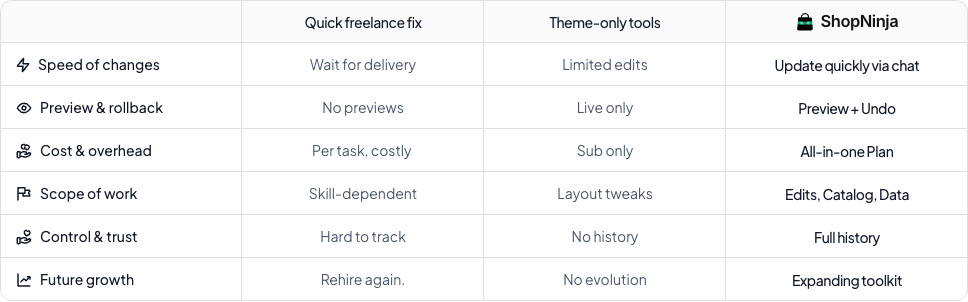
Response Time
- Freelancers: 2-7 days to start
- Theme Editors: Immediate
- ControlClaw: Immediate
Cost for Simple Update (e.g., change banner, update text)
- Freelancers: $100-300
- Theme Editors: Free (if possible)
- ControlClaw: Included in subscription
Cost for Complex Change (e.g., new section, custom feature)
- Freelancers: $500-2,000+
- Theme Editors: Not possible
- ControlClaw: Included in subscription
Availability
- Freelancers: Business hours, often booked
- Theme Editors: Always available
- ControlClaw: Always available
Code-Level Control
- Freelancers: Full access
- Theme Editors: None
- ControlClaw: Full access with AI guidance
Safe Preview Environment
- Freelancers: Depends on developer
- Theme Editors: Limited
- ControlClaw: Built-in staging
When to Choose Each Option
Choose a Freelancer When:
- You need a complete store redesign or ground-up build
- You're integrating complex third-party systems
- You want someone to manage your store long-term
Choose Basic Theme Editors When:
- You only need simple text or image updates
- You're comfortable with template limitations
- Budget is extremely tight
Choose ControlClaw When:
- You make frequent updates to your store
- You want code-level control without learning to code
- You need changes fast without scheduling delays
- You want predictable monthly costs
- You're an agency managing multiple stores
The Verdict
For most Shopify store owners, the freelancer model is broken. You're paying premium rates for simple tasks, waiting days for availability, and dealing with communication friction. Basic editors are free but leave you stuck when you need anything beyond surface-level changes.
ControlClaw fills the gap. It gives you developer-level capabilities with the convenience of a tool that's always ready when you are. For the cost of a single freelance project, you get unlimited access to AI-powered theme editing for months.
Get Started Today
Ready to take control of your Shopify store without the freelancer headaches or editor limitations?
Sign up for ControlClaw and make your first update in minutes, not days. Your store deserves better than waiting in someone else's queue.
Questions about how ControlClaw compares for your specific needs? Reach out at support@controlclaw.ai